



Windows file management has a glaring weakness. You open your drive, and it’s a sea of identical yellow folders. It looks boring. It feels chaotic. Trying to find that specific contract from 2019 becomes a scavenger hunt you didn’t ask for.
Folder Marker Free steps in to fix this visual monotony. It is not just about making your desktop look pretty. It is about efficiency. By assigning distinct colors and icons to your directories, you create a visual shorthand that your brain processes faster than reading text.
Think about your workflow. You probably juggle multiple projects. Some are urgent. Some are low priority. Without visual cues, you have to click into every single folder to check its contents. That is a waste of time. With this tool, a red folder screams “urgent.” A green one says “done.” You spot it instantly. You skip the click. You save seconds that add up to hours over a year.
The software focuses on simplicity. There is no steep learning curve. No complex configuration menus to navigate. You right-click a folder. You select an option. The color changes. That’s it. It works for anyone, whether you are a tech enthusiast or someone who just wants their documents organized.
Installing Folder Marker Free on Windows
Getting the software running is straightforward. You need to go to the official Futura page to download it. Do not skip this step. Downloading from unofficial sources introduces risk. You want a clean installer, not a trojan in disguise.
Once you have the file, the installation wizard guides you through the process. It is gentle. It does not ask for unnecessary permissions. It does not bundle bloatware. You click next, and it installs.
Compatibility is broad. It runs on Windows 7, 8, 10, and 11. If you are on an older machine, it still works. If you are on the latest hardware, it is stable. This wide support base explains its popularity. It does not break when Microsoft updates the OS.
There is a catch, though. It only works on Windows.
If you use macOS, Linux, Android, or iOS, you are out of luck. The tool does not exist for those platforms. The reason is technical. Apple handles folder icons differently at the system level. The logic Folder Marker uses on Windows simply does not translate to Mac’s internal structure. So, if you are in the Apple ecosystem, you need a different solution.
Why Free Is Actually Enough
You might wonder why they give it away. The free version is fully functional. It does not slap a watermark on your folders. It does not lock core features behind a paywall after a 14-day trial.
There is no account creation required. No email needed. No license key to manage. This is a relief. Many tools today feel like traps, designed to harvest your data or force a subscription. This one just works.
Of course, there is a paid version. It offers advanced features like batch processing on steroids or more complex icon sets. But for most people, the free tier covers the bases. You can categorize projects. You can flag important files. You can group similar items. The visual gain is significant even without the premium upsell.
Is it perfect? No software is. It only changes the Windows shell view. It does not restructure your files. You still need to decide what goes where. But once the decision is made, this tool makes finding it effortless.
The question remains: how much time do you actually spend looking for things? Probably more than you admit. A few seconds saved per search, multiplied by dozens of searches a day, creates a noticeable shift in how you interact with your computer. It turns a cluttered mess into a color-coded system.
You install it. You drag a few icons. Suddenly, your drive feels less like a storage unit and more like a workspace. The visual noise drops. The signal rises. It is a small change in the interface, but it changes the experience of using the computer.

Why Folder Marker Free Beats Custom Folders for Windows Organization
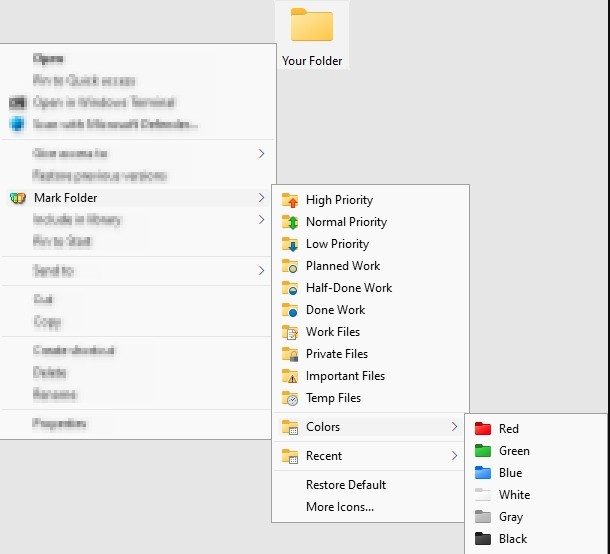
Most folder customization tools force you to juggle windows. You open a separate app, pick a color, and hope it sticks. Folder Marker Free doesn’t play that game. It hooks directly into the Windows File Explorer context menu. Right-click a folder. Pick a color. Done. No popup windows. No workflow interruption.
This isn’t just about convenience. It’s about speed. Compare this to rivals like CustomFolder or Rainbow Folders. Those options often bloat your system with unnecessary interfaces. Folder Marker Free strips that away. It’s stable. It’s simple. You get distinct colors and symbolic icons for work, family, or high-priority tasks without the bloat.
The free version covers the essentials. That’s usually enough. Need to group actions? You can. Want a red tag for urgent files? Click. It’s the lightweight approach that most IT pros actually prefer.
Professional Use Cases and Legacy Support
This isn’t just for decluttering your desktop. In shared network drives, visibility is currency. Folder Marker Free lets you flag sensitive or priority folders instantly. In large-scale collaborative environments, that clarity translates directly to operational efficiency. You stop searching. You start working.
But what if you’re stuck on older hardware? Or just love the workflow of a previous version? The developers host an archive on their official site. You can download older builds safely. This matters for compatibility with legacy machines or for teams that have built habits around specific interface behaviors over the years.
Roadmap: Deeper Windows Integration
The evolution path is clear. Expect tighter integration with core Windows features and a broader palette of custom icons. There’s no official certification process for this tool. Why? It’s too simple. You don’t need a degree to right-click and color-code.
Instead, the community fills the gap. Online forums and user-generated tutorials abound. They break down the nuances of the free tier. The developer pushes regular updates to ensure compatibility with every new Windows release. You can force an update via the “Help” menu or just grab the latest installer. It’s designed to keep working, even as Microsoft changes the underlying OS.
The “Free” Label: Students, Pros, and Pricing
Does “Free” mean stripped-down? Not here. The app is free for everyone. Students. Non-profits. Enterprises. No tiered pricing for access. The core functionality—color coding and icon assignment—is available to all Windows users equally.
The paid version exists for power users. It offers bulk icon sets, saved themes, and advanced template management. If you need more than basic color tags, you pay. If you just need to know which folder is “Tax Docs,” you don’t.
Installation and Compatibility Reality Check
Installation is standard. A step-by-step wizard. No registry hacking. No admin headaches. If you get stuck, the forums or technical support steps in. Documentation is sufficient for most queries. Keep it updated via auto-refresh or manual download to avoid Windows update conflicts.
But here’s the catch: It is Windows only.
Folder Marker Free supports Windows 7 through the latest builds. That’s it. No macOS support. No Linux. No Android. No iOS. The reason is structural. File system handling and icon metadata differ wildly across operating systems. The tool relies on Windows-specific hooks that don’t translate elsewhere.
If you’re on a Mac, look elsewhere. If you’re on Windows, this is a durable, ergonomic solution. It works. It’s free. And it respects your time.
So, you’ve got your folders colored. Your workflow is faster. But what happens when the next major Windows update breaks the context menu integration? The developers promise stability. But in the world of system-level tweaks, nothing is truly permanent. Just reliable. For now.

The Technical Reality of Folder Marker Free
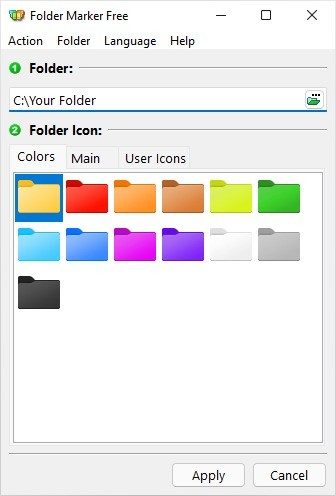
Let’s cut through the noise. You don’t need a bloated suite to color-code your drives. Folder Marker Free works because it refuses to be complicated. It slots directly into the Windows Explorer right-click menu. No separate window to manage. No floating panels. Just click, pick a color, done.
The footprint is tiny. We’re talking a few megabytes of space. This matters for legacy systems still running in server rooms or corporate IT closets. If you’re on Windows 7 or an older x86 machine, this tool doesn’t choke your resources. It’s native. It uses Windows’ own mechanisms for folder attributes. That means if the OS updates, the tool likely survives the transition. Compatibility isn’t an afterthought; it’s built-in.
Offline First, Always
Here’s the part most “smart” tools get wrong: they assume you’re always online. Folder Marker Free assumes you might not be. Once installed, the core functionality is entirely offline. This isn’t just a convenience; it’s a security feature for restricted environments. Air-gapped networks? Private servers? It works. The icon data is stored locally in your Windows profile, not some cloud database that vanishes when the Wi-Fi drops.
The license is freeware. That means no subscription traps, no monthly fees, and no forced telemetry. You can deploy this across a dozen workstations for personal or professional use without legal headaches. It’s maintainable because it’s simple.
System Requirements and Specs
The specs are unremarkable by design. That’s the point.
- Publisher: ArcticLine Software
- OS Support: Windows 11, 10, 8/8.1, and 7 (both 32-bit and 64-bit).
- Architecture: x86 and x64.
- Installation: Standard
.exeinstaller. Admin rights are recommended, though often not strictly required for user-level icon changes. - Icons: Supports standard
.icofiles and Windows.icllibraries. - Language: English interface, though packaging may vary by region.
- Dependencies: None. No .NET frameworks to hunt down. No Visual C++ redistributables to beg for from Microsoft’s archives.
You need a mouse and a keyboard. You need a few megabytes of free disk space. If you have that, you can customize your file explorer.
Why This Specific Build Matters
Downloading from reputable sources like Futura ensures you get a clean installer. There’s no bundled bloatware. No “optimizer” extensions. Just the tool. The integration is deep but respectful—it modifies the visual presentation of folders without altering the underlying file structure. Your data remains untouched. You aren’t moving files into special folders to make them look different. You’re just telling Windows to draw them differently.
Is this revolutionary? No. Is it necessary? For anyone who has ever opened a directory of twenty folders named “Doc1,” “Doc2,” and “Misc,” yes. The mental load of deciphering gray icons on a gray background is real. Folder Marker Free removes that friction.
The tool persists. It lives in your profile. You uninstall the app, and the colors often remain because Windows Explorer caches them. You reinstall the app, and it picks up right where you left off. It’s a quiet utility. It doesn’t ask for attention. It just makes your desktop slightly more readable, one click at a time. And in a world of constant updates and forced changes, that stability is rare.


