


The rush toward faster internet isn’t slowing down. We’ve moved from dial-up to broadband, and now home networks are demanding even more bandwidth. Currently, cable modems and Asymmetric Digital Subscriber Line (ADSL) dominate the market. They are fast compared to the old 56K modems, sure. But they hit a ceiling. They struggle to handle the future of home entertainment, like digital television and video-on-demand, all at once.
Enter Very High Bit-rate DSL, or VDSL.
Industry experts view VDSL as the logical next step for a fully integrated home communications package. Some providers, like U.S. West (now part of Qwest), have already rolled out limited services. The specs are impressive. VDSL offers speeds up to 52 megabits per second (Mbps). Compare that to the 8–10 Mbps cap of standard ADSL or cable. The jump is massive. It feels like the leap from dial-up to broadband all over again. As VDSL becomes more common, bundled services will likely become cheaper than paying for separate lines.
To understand why this matters, we need to look at the basics of how DSL works on existing infrastructure.
How DSL Piggybacks on Phone Lines
A standard U.S. phone installation uses a pair of copper wires running into your home. These wires have plenty of raw bandwidth. Voice calls only use a tiny fraction of that capacity. DSL exploits the unused space. It carries data without interfering with your voice conversations.
Standard phone equipment limits the frequency range. Human speech typically occupies 400 to 3,400 Hertz. The copper itself can handle frequencies in the millions of Hertz. Modern digital equipment uses this extra room. DSL sends data digitally over these high frequencies.
This extra bandwidth allows VDSL to change how we access e-commerce and media. Smooth video and heavy data loads become possible on a single line.
The Baseline: ADSL
Before diving deeper into VDSL’s specific advantages, it helps to understand the technology it builds upon. ADSL has been the standard for years. It splits the line into two channels: one for voice and one for data. It is asymmetric because the download speed is faster than the upload speed. This matches typical user behavior. We download more than we upload.
But ADSL has limits. Distance matters. The further you are from the provider’s central office, the slower your speed drops. VDSL solves many of these distance and speed constraints, but it requires different infrastructure considerations.
Why VDSL Matters Now
The push for VDSL isn’t just about faster downloads. It’s about convergence. We want to stream 4K video, play online games, and video chat simultaneously without buffering. Current broadband tech struggles with this load. VDSL provides the pipe size needed.
VDSL provides an incredible amount of bandwidth, with speeds up to about 52 megabits per second (Mbps).
This speed allows for a complete home-communications/entertainment package. One line. One service. Multiple streams.
The Hardware Reality
VDSL isn’t magic. It uses the same copper wires as your phone. But it requires specialized VDSL modems. These devices separate the high-frequency data from the low-frequency voice signals more efficiently than older ADSL modems. The trade-off? VDSL signals degrade faster over distance. You usually need to be closer to the central office or a remote node to get those top speeds.
This proximity requirement is a key hurdle for widespread adoption. Providers must invest in fiber-to-the-node infrastructure to make VDSL viable for most homes. It’s a step toward fiber-to-the-home (FTTH), but it uses existing copper for the “last mile.”
What’s Next?
We’ve covered the basics of DSL and seen why VDSL is positioned as the next big shift. It offers speed, integration, and potential cost savings. But how does it actually perform in real-world scenarios? And what are the specific technical differences that make it superior to cable?
We will explore these details in the following sections. The infrastructure is ready. The demand is there. The technology is waiting.

The Hardware Behind the Connection
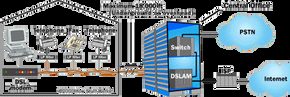
If you look under your desk, you probably see a box the size of a paperback book. Most people call it a DSL modem. The engineers at your ISP call it an ATU-R, or ADSL Transceiver Unit – Remote. It’s the same thing. This device is the bridge. It takes the digital data from your laptop or router and translates it into signals that can actually travel down the copper phone line.
On the other side of that long, winding wire is the other piece of the puzzle: the DSL access multiplexer, or DSLAM. Think of the DSLAM as a massive traffic coordinator. It sits in the telephone company’s central office, pulling in connections from hundreds of homes and aggregating them onto a single, high-capacity fiber trunk that leads to the wider Internet. It’s flexible hardware. It handles routing, assigns dynamic IP addresses, and juggling multiple DSL standards simultaneously.
For residential users, the ATU-R is usually a standalone box. You plug it in via Ethernet or, less commonly these days, USB. Business-grade equipment is different. Those boxes often swallow routers and switches into one chassis, handling more complex networking duties in the same enclosure. But the core job is identical: move data between your network and the DSLAM.
Why Distance Kills Your Speed
DSL is not magic. It is physics. And in physics, distance is the enemy.
As the signal travels down the copper wire, it degrades. Noise creeps in. High-frequency data components attenuate. The longer the run, the slower and less stable the connection becomes. ADSL has a hard theoretical limit of 18,000 feet (about 5.46 kilometers) between the modem and the DSLAM.
But that number is optimistic. Most providers enforce a shorter, stricter cutoff to guarantee service quality. If you are at the upper extreme of that range, you’ll see speeds far below what the marketing material promises. If you’re close to the central office, you’ll get the full speed—and potentially more, as technology upgrades allow higher frequencies to travel further without degrading.
“DSL is a distance-sensitive technology: As the connection’s length increases, the signal quality and connection speed decrease.”
The Loading Coil Problem
Here is where it gets weird. If voice calls can travel miles without losing clarity, why can’t DSL?
The answer is loading coils.
Telephone companies installed these small electromagnetic coils inside the loop between your house and the central office to boost voice frequencies. They act as amplifiers for low-frequency audio. They are great for talking. They are terrible for data.
DSL uses much higher frequencies for data transmission. The loading coils block or distort these high-frequency signals. If your line has a loading coil installed anywhere between your home and the exchange, DSL simply cannot work. The signal integrity is disrupted before it even starts.
Other Showstoppers
Even if you don’t have loading coils, other factors can disqualify you from ADSL service entirely. It’s not just about distance. It’s about the physical path of the wire.
- Bridge taps : These are extensions off the main line that service other customers. They create impedance mismatches. The signal bounces around, causing interference. If your line has a bridge tap, DSL performance will suffer or fail completely.
- Fiber-optic segments : ADSL signals are analog. They cannot pass through the conversion points where a copper line is replaced by a fiber-optic cable. If any portion of your circuit goes through fiber, the signal dies. You need a continuous copper run from the wall jack to the central office.
- The hidden path : Don’t look at a map and assume distance. The wire doesn’t go in a straight line. It snakes through conduits, follows street curbs, and takes convoluted routes that add hundreds of feet of unnecessary length. The telephone companies rarely publicize the exact location of their central offices. You have to trust the diagnostic tools to tell you your actual line length.
The Fiber Exception
Fiber-optic cables are one of the major disruptors for ADSL. They kill the signal.
But they are also the reason for the next evolution in broadband. While copper fails when it meets fiber, VDSL (Very-high-bit-rate Digital Subscriber Line) is designed to work with fiber networks in specific architectures. It leverages shorter copper runs combined with fiber-to-the-node setups to deliver significantly higher speeds than ADSL ever could.
VDSL Speed
The limitations of copper are clear. The degradation is physical. The solutions require a shift in infrastructure. VDSL doesn’t just push more bits down the same broken line. It changes the game entirely by shortening the copper segment and relying on fiber for the heavy lifting. The result isn’t just faster. It’s a different kind of connection. And as fiber deployment continues to replace copper loops, the relevance of ADSL fades into history. The question isn’t whether you can get more speed on DSL. The question is whether you’re still stuck on it at all.


VDSL runs on the same copper infrastructure as its predecessor, ADSL, but it pushes the boundaries of what that aging metal can handle. The speed difference is stark. While ADSL caps out at a sluggish 8 Mbps downstream and a mere 800 Kbps upstream, VDSL delivers up to 52 Mbps downstream and 16 Mbps upstream. That is not just an upgrade; it is a generational leap in performance.
There is a catch. Copper degrades over distance, and VDSL is particularly sensitive to this. To maintain those blistering speeds, the connection must stay within roughly 4,000 feet (1,200 meters) of the source. For many suburban users living a mile away from the neighborhood node, VDSL on its own simply cannot reach the end of the line.
The Fiber-to-the-Node Solution
Telcos solved the distance problem by extending fiber-optic cable closer to your doorstep, leaving only the final “last mile” of copper to bridge the gap to your home. This approach typically takes two forms: Fiber to the Curb (FTTC) or Fiber to the Neighborhood (FTTN).
In an FTTC setup, fiber runs all the way to the street corner, replacing copper up to the point where the line branches off into individual homes. FTTN is slightly less aggressive, running fiber only to the central junction box for the entire neighborhood. In both scenarios, the goal is the same: minimize the length of the copper run to maximize bandwidth.
How the VDSL Gateway Bridges the Gap
The magic happens with a piece of hardware called a VDSL gateway installed in the neighborhood junction box. You also need a VDSL transceiver at your house.
This setup solves a fundamental problem. Standard ADSL equipment cannot talk directly to fiber-optic lines because they use different signaling methods. The VDSL gateway acts as the translator. It receives high-speed data from the transceiver in your home, converts that electrical signal into pulses of light, and beams it down the fiber-optic cable to the central office.
When you request data, the process reverses. The gateway takes the light signals from the fiber, converts them back into electrical data, and sends them to the transceiver in your home. This conversion cycle happens millions of times per second, maintaining the integrity of the high-speed connection despite the hybrid nature of the network.
Where DSL Fits in the Spectrum
VDSL and ADSL are just two points on a much broader DSL spectrum. As technology evolves, the distinctions between these standards become less about raw speed and more about how they balance distance, infrastructure cost, and user demand.
Comparing DSL Types
Understanding the trade-offs between these variations helps explain why some providers push fiber while others stick with copper upgrades. The chart below breaks down the specific capabilities of each DSL variant, showing exactly where VDSL sits in the hierarchy of broadband technologies.
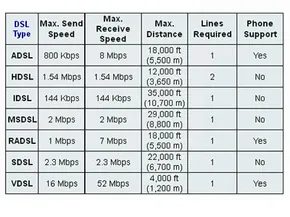

The term xDSL pops up constantly when tech folks talk about digital subscriber line infrastructure. The “x” is a placeholder, a wildcard for the specific variant in question. It’s not one technology. It’s a family. A messy, evolving family of protocols that all share the same basic trick: squeezing data over existing copper phone lines.
Understanding which variant you’re dealing with matters. Speeds differ. Distance limits differ. Hardware requirements differ. If you’re picking a provider or configuring enterprise gear, knowing the difference between Asymmetric and Symmetric isn’t just trivia. It’s the difference between a smooth streaming session and a buffering nightmare.
Asymmetric DSL (ADSL)
This is the standard bearer for residential users. Hence the name “asymmetric.” Download speeds dwarf upload speeds. Why? Because the typical home user consumes more than they create. You watch Netflix. You load web pages. You download files. You rarely send massive datasets back to the server.
ADSL optimizes for this behavior. It allocates more bandwidth downstream. The result is fast browsing and streaming. Uploads are an afterthought. Usually capped at a fraction of the download rate. For most people, this trade-off works perfectly.
High Bit-rate DSL (HDSL)
HDSL takes a different approach. It offers transfer rates comparable to a T1 line. That’s roughly 1.5 Mbps. But it demands symmetry. Upload speed equals download speed.
There’s a catch. HDSL requires two separate physical lines. They are distinct from the standard voice channel. This makes it expensive. And bulky. It’s rarely seen in homes. It belongs in office backbones or dedicated business links where consistent bidirectional throughput is non-negotiable.
ISDN DSL (ISDL)
ISDL is a niche player. It’s geared toward legacy users of Integrated Services Digital Network (ISDN). If you’re still running old ISDN equipment, ISDL lets you keep it. You don’t need new modems.
But the speed gain is marginal. ISDN runs at 128 Kbps. ISDL operates at a fixed 144 Kbps. The improvement is about 16 Kbps. Is it worth the upgrade? For most, no. The performance bump is negligible compared to the cost of changing infrastructure.
Multirate Symmetric DSL (MSDSL)
MSDSL breaks the rigid speed mold. It offers symmetric transfer, but the rate isn’t fixed. It’s adjustable. The service provider sets the specific tier based on the customer’s price plan.
Need 1 Mbps symmetric? Fine. Want 2 Mbps? Pay more. It offers flexibility. It allows providers to tier their service without building entirely new physical networks for each speed bucket.
Rate Adaptive DSL (RADSL)
RADSL is a smart evolution of ADSL. It doesn’t just assume a fixed speed. It measures the line. It checks the length. It assesses the quality.
If the line is noisy or too long, the modem backs off. It lowers the speed to maintain stability. If the line is pristine, it pushes for higher speeds. It’s dynamic. It adapts to the hardware reality of your home wiring. This is why some ADSL users get 8 Mbps and others get 1 Mbps on the same plan. The line decides.
Symmetric DSL (SDSL)
SDSL mirrors HDSL’s symmetric nature. Upload equals download. But it’s more efficient with infrastructure. It uses a single line. HDSL needed two.
Still, it requires a separate line from the standard voice phone service. You can’t use your internet connection to make


The race to define the future of high-speed DSL was messy. On one side, you had the VDSL Alliance—a coalition including Alcatel and Texas Instruments—pushing for Discrete MultiTone (DMT) as the carrier system. On the other, the VDSL Coalition, led by Lucent and Broadcom, argued for a mix of Quadrature Amplitude Modulation (QAM) and Carrierless Amplitude Phase (CAP).
DMT won.
Today, most ADSL equipment relies on this technology. Why did the engineers pick it? It comes down to how DMT handles the physical reality of copper lines.
The Mechanics of Discrete MultiTone
Imagine your single copper phone line isn’t a single pipe, but a highway with 247 separate lanes. That’s essentially what DMT does.
It slices the signal into 247 distinct channels. Each channel is 4 kilohertz (KHz) wide. If you want a rough mental model, picture the phone company taking your line and attaching 247 individual modems to it simultaneously. You aren’t getting one connection. You’re getting 247.
This isn’t just theoretical. The system is active.
Dynamic Channel Assignment
Not all copper lines are created equal. Noise, interference, and distance degrade signals differently at different frequencies. DMT accounts for this by constantly monitoring each of the 247 channels.
If a channel’s quality drops below a usable threshold, the system doesn’t just give up. It moves the data to a clearer channel. It’s a constant search for the best path for both transmission and reception.
Some of the lower channels, starting around 8 KHz, serve a dual purpose. They handle bidirectional traffic—meaning they carry both upstream and downstream data. Sorting this information while keeping a finger on the pulse of all 247 channels makes DMT more complex to implement than its competitors.
But that complexity buys you flexibility. It allows the connection to adapt to lines of varying quality, something rigid carrier technologies struggled to do.
Why It Matters for You
You don’t need to know the difference between QAM and CAP to use the internet. But you should care that DMT became the standard.
Because DMT could handle noisy, older infrastructure better than QAM or CAP, it rolled out faster. This meant more people got high-speed access sooner. The trade-off was hardware complexity. The modems had to work harder to manage the channel shifting. But for the average user, the result was a more stable connection on lines that might have otherwise been unusable for high-speed data.
Frequently Answered Questions
Is ADSL better than VDSL?
No. VDSL is superior because it supports significantly higher data rates than ADSL. ADSL was an early step; VDSL was the finish line for DSL technology before fiber took over.
Lots More Information
For deeper dives into VDSL specs and legacy DSL architectures, check the links on the next page.


