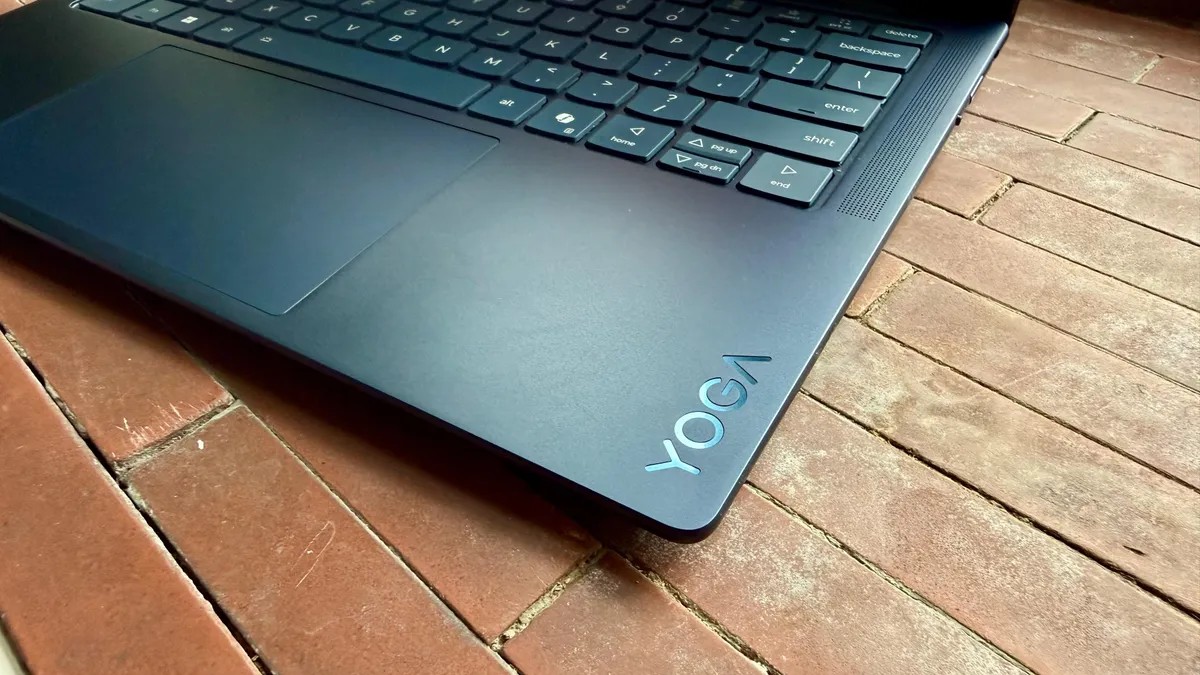
Blue metal. Sleek lines. A price tag that starts reasonable but immediately gets out of hand.
The Lenovo Yoga Slim 7x (11th Gen) is what happens when you ask for a midrange laptop but insist on OLED glass. It’s the 11th version. Confusingly so, given that it’s not a convertible like older Yogas, nor is it cheap. It slots between the budget IdeaPad and the luxury Yoga 9, powered by Qualcomm’s Snapdragon X2 chips.
Starts at $1,200? Sure. My review unit hit $1,700 after I added the good CPU and the memory I actually wanted to use.
You get a lot of computer. You also get zero headphone jack.
The Specs Game
Let’s talk numbers. Then we can talk about the mess of configurations.
Lenovo sells fixed rigs and custom ones. The base model costs $1,200 (sometimes $1,149 on sale) and gives you the X2 Plus processor, 16GB of RAM, and 512GB of storage. It has a 1080p-class OLED (technically 1920×1200). That’s… adequate.
My test machine cost $1,700 list (I got it for $1,500). It swaps in the Snapdragon X2 Elite, bumps RAM to 32GB, and adds 1TB of storage. Best Buy sells it for $1,850. Buy direct unless Best Buy has a fire sale.
If you have more money and less patience for pixels, there’s a top-tier config at $1,900. It keeps my CPU specs but upgrades the screen to a 2.8K, 120Hz OLED that gets to 1,100 nites in HDR.
International readers? The UK sees prices starting around £1,082. Australia gets hit harder at AU$1,995+.
Speed With Conditions
The X2 Elite processor here has 18 cores. An NPU rated at 80 TOPs.
In Geekbench 6? It crushes the M5 MacBook Air in multicore scores, hitting over 19,00 points. Cinebench follows suit. The NPU beats Apple in Geekbench AI benchmarks, too. If you are doing local AI inference, this thing eats it for breakfast.
Single-core speed? Decent. Not blinding.
Then there’s the GPU. Qualcomm Adreno integrated graphics are fine for YouTube. They are not fine for 3D rendering or heavy gaming. If you try to run complex Windows applications, remember you’re on Windows on ARM. Most stuff works. Some specialized engineering software doesn’t. Check compatibility. Or don’t bother.
Battery life saves it though.
22 hours of YouTube playback. That is absurd. Sure, an Intel Panther Lake machine lasted three hours longer in testing. An HP OmniBook hit 28+ hours. But twenty-two is still “I never see the charger for two business days.”
Pretty, But Heavy
Cosmic Blue looks expensive. It is metal. It feels rigid.
It is also a magnet for fingerprints. Wipe it often. Or hate it.
Weight is where it trips. It’s 2.9 pounds (approx 1.3kg). That feels average for a 14-incher on paper but heavier than you’d expect looking at how thin it is. The MacBook Air (13-inch) is 2.7 pounds. The Asus Zenbook is 2.2. If your backpack gets full of books, those 0.5 extra pounds matter.
Keyboard? Top tier. ThinkPad-quality snap and depth. I love typing on this.
Touchpad? Meh.
It’s a mechanical trackpad on a $1,700 machine. The clicks feel uneven near the top. Haptic touchpads exist. They provide uniform pressure anywhere on the surface. Lenovo didn’t include one here. I accept compromises on budget laptops. On a premium-priced OLED deck? It feels like a cost-cutting trick.
The speakers, however, surprised me. Four of them. Tweeters front, woofers sides. Bass presence? Actual separation between highs and lows. Not Hi-Res audio quality, but better than 90% of the clamshells I’ve reviewed this year.
The Screen and The Ports
Here is the trap.
You pick up the laptop expecting premium features everywhere. Then you try to plug in wired headphones.
You need dongles.
There are only three ports. All of them USB4. Fast, yes, but proprietary. No HDMI. No USB-A. No audio jack. Bring an adapter or accept silence.
The display itself? It depends which config you bought.
My review unit had the lower-resolution 1920×1212 OLED. It is sharp enough for casual use, but if you edit 4K video or read dense spreadsheets, text can look slightly soft. Pixelated edges appear on crisp lines. The alternative costs an extra $200-$600 depending on how you order, and upgrades to 2800×1800.
The good news: the colors are perfect.
100% sRGB. 100% DCI-P3. 95% Adobe RGB. Peak brightness of 393 nites is plenty because OLED blacks are true black. Contrast is infinite.
Oh, and the webcam is 4K. IR sensor included. No fingerprint scanner means face unlock is your only biometric option. It works. Fast.
So, Should You Buy It?
If you are a gamer? No.
If you edit large video files in Premiere Pro daily? Probably no, unless you have a portable GPU enclosure and a lot of patience.
If you want a machine that slides into a briefcase, types like a dream, displays movies like a theater screen, and lasts 22 hours on a single charge? Then yes.
Just accept that you are paying a premium for an experience that leaves you dependent on USB4 dongles and Windows on ARM emulation.
Is the tradeoff worth it for $1,700?
Most days, the battery and the screen say yes. The port selection says please reconsider.
Great machine. Strange choices.