What is the first thing that comes to your mind when you hear the sound of sirene? Probably your loved ones. In moments of crisis, it can be difficult to find a corner of the digital world. Facebook understands this. The “I’m Safe” feature is a simple but critical tool designed to streamline some of the chaos. This button is the fastest way to send the message “I’m here, it’s okay” to your loved ones in the event of a disaster.
Emergencies are not unusual. Earthquake, hurricane, terrorist attack… Whatever happens, communication breaks down. Networks collapse. But Facebook’s server usually survives. It fills this gap. The feature connects you and your loved ones. Just pressing a button is enough.
Why Is There This Button?
Think about it. There was an explosion in the city. Social media is confused. Everyone panics. You are safe. But your relatives are worried. You can’t call and get an answer. This is where “I’m Safe” comes into play.
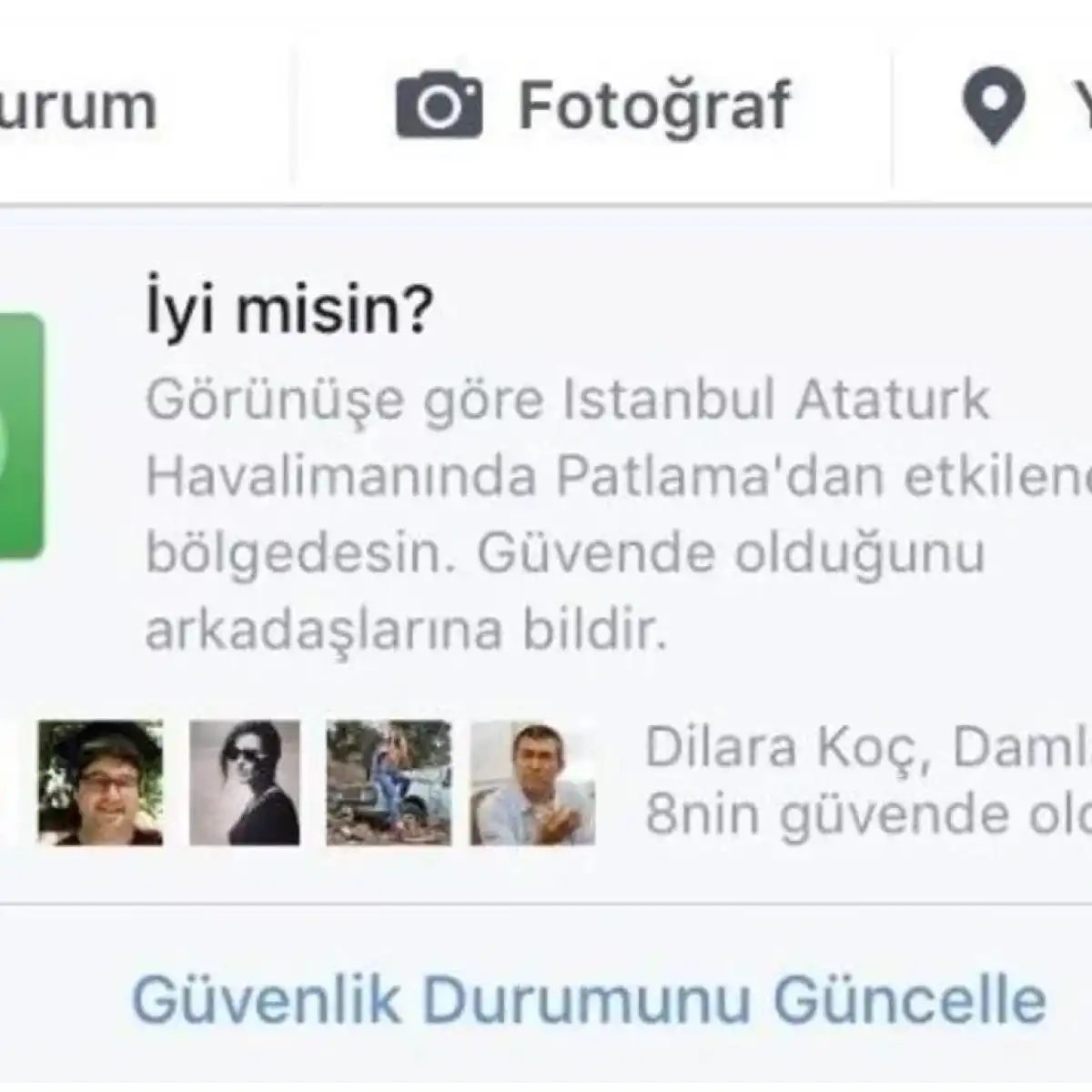
This feature allows users to reassure friends and family members within the community. It is fast. It is easy. When activated in a known incident zone, you will automatically receive a notification. “Are you here?” It asks you to answer the question.
Some think this is enough. Maybe so. Don’t expect a perfect system in case of emergency. But a quick pointer is worth more than long explanations.
How Does It Work?
The mechanism is simple. When Facebook announces a local or national disaster, you’ll see this button on your profile or news feed. You click. Your status is marked as safe. Your friends will see this instantly.
For what types of disasters is it used?
– Natural disasters: Fires, floods, earthquakes.
– Human-caused crises: Attacks, cyber attacks (less common but possible).
– Other emergencies: Severe weather events.
The feature is based on geographic location. If you’re in or visiting the disaster area, there’s a good chance you’ll see the button. If you’re not, you probably won’t see it.
The “I am safe” notification is merely an informational tool. It is not a real rescue operation.
How Easy to Use?
It’s really easy. It is done with one click. But there are some details.
First, for the button to appear, Facebook needs to know that it tracks disasters in your area. This happens automatically. You don’t need to do anything.
In major disasters around the world, the first response is often to the plight of those close to us. But what if communication breaks down? This is where Facebook’s answer to the question How Does the Facebook Trust Button Work? comes into play. This system was designed to build a bridge between people in emergency situations. It has two main components: I’m Safe button and Security Check. They both serve the same purpose, but the way they are used is slightly different.
Disaster Notification Process
Normally during a disaster, Facebook automatically notifies users in that area that Safety Checkup has been activated. This drops directly to your profile or friends. However, the I’m Safe button comes into play to reach a wider audience.
Users update their status by selecting the “I’m Safe” option on their Facebook accounts. This simple action results in a badge appearing on your profile. Your friends will understand your situation by looking at this badge instead of trying to call you. They don’t have to wait for a message for hours to say “I’m fine, I’m fine.”
“In the event of a disaster, showing that you are safe without wasting time relieves the psychological burden of both you and your loved ones.”
I’m Safe Notification Sharing Mechanism
So how does this notification spread? Facebook sends a direct notification to its users and asks them to click “I’m Safe.” This is a completely voluntary action. Once the user confirms, it becomes visible in their feed and profile.
This sharing is not limited to just your circle. The system makes it easy to connect with other people in a similar situation. However, there is one point you need to be careful about. Once you approve your report, it may become public. This can lead to confusion with incorrect timing, except in the case of a true disaster.
Difference Between Security Control and Communication
Most people confuse these two concepts. The I’m safe button simply indicates that you are safe. Security Control allows you to monitor the status of people in that area. So, if you are in a disaster area, you can see if other people in that area are safe too.
Facebook provides a special section to show these notifications. This is the second part of the question How Does the Facebook Trust Button Work?. By entering this section, users can follow I am safe notifications and learn the status of other people.
Enable the security check function
To get this tool working, start from the settings menu. Log in and go to the Security or Privacy section. Look for the “Security Diagnostics” option. The stickers may vary slightly depending on your region, but the functionality is the same. Toggle it on. This provides a mechanism for others to know that you are okay during a crisis.
Submit your status
When disaster strikes, the user interface changes. A new banner or announcement appears in the news feed. Click the “It’s safe” button. A box will appear. You can add a custom message. Keep it brief. The goal is clarity. Click to share. Your friends will see the notification immediately. It cuts through the noise of normal posts.
Return to normal
The status is not automatically removed when the emergency is removed. You have to remove it. Return to your profile or news feed. Look for the “Not Secure” or “Remove Status” link near the previous banner. Click on it. The mark disappears. Your friend’s feed will no longer show that this affected you.
This feature is designed for speed. Accuracy of language is more important than transmission speed of signals.
Why use this over a standard post? Algorithms bury regular updates. The security check is highlighted. They appear in a dedicated section of the app. This ensures visibility.
Who can see it? Friends. People who have connected with you through groups and pages. It is not public by default.
Where is it activated? Only if Facebook officially declares an emergency. You can’t just click for fun. The system restricts usage to certain verified events.
How does it help emergency services? It reduces call volume. People stop calling 911 and local hotlines when they know their loved ones are safe. It frees up lines for actual rescues.
What platforms are supported? Mobile apps and desktop browsers. The experience is nearly identical. Consistency is key in times of chaos.
Is it mandatory? No, this is an opt-in. However, this option is always available once the event has been reported.
What happens if I make a mistake? You can edit or delete your status. There are no penalties. Accuracy improves over time.
Does it apply to events other than disasters? Usually not. Facebook reserves it for a major crisis. Earthquakes. Floods. Major accidents. Small incidents do not trigger the banner.
Can you control who sees it? Apply basic privacy settings. You can restrict certain friends. But the default reach is wide.
Why is this better than texting? Texts get lost. Emails are buried. This pushes a notification. It is harder to ignore.
How long does the status last? Until I remove it. or until the event is officially over. Sometimes Facebook auto-clears it after a set period.
Does it affect the news feed algorithm? Slightly. Your friends’ feeds prioritize the safety update. It pushes other content down temporarily.
What if I don’t have internet? This feature requires a connection. You cannot use it offline. However, the application caches the action after sending it.
Is there a way to verify the status? No, this is self-reporting. Trust is built-in.
How do I know an event is active? A banner will appear. If push notifications are enabled, you will also receive push notifications.
Can it be used in medical emergencies? Only if specified by Facebook
Why the “I’m Safe” feature is more important than you think
Most people think of security features as checkboxes. Click on it. Move forward. But Facebook’s “I’m safe” button works differently. It’s not just about checking a box. It’s all about speed.
The biggest advantage is noise reduction. During a crisis, writing a text message can feel heavy. This takes time. This button changes the physics of the communication.
Get clarity in chaotic situations with one click
How it works when seconds count
You don’t build a story. Just send the status. Tap a few times. Done.
“Facebook’s Safe button allows users to quickly confirm their safety with just a few clicks.”
This is not a theoretical matter. This is very practical. When the ground shakes or the alarm goes off, your brain doesn’t want to type. It wants to send a signal. This button does just that. Turn your anxiety into a simple data point.
Reaching your actual network
Next is the sphere of influence.
Traditional methods fail when the network becomes congested. SMS queues back up. Calls drop. But Facebook’s infrastructure is strong. Notifications are immediately forwarded to your friends and contacts.
You don’t need to call your mother. You don’t need to text each of your three cousins separately. The post hits their feed. they saw it. They know you’re okay. It bypasses the gatekeepers.
Reciprocity in emergency situations
This is a two-way street.
When you signal safety, others will do the same. Or ask for help. This system is not just passive. It is interactive. You can share your needs. Others can also answer.
It creates a localized mesh network of concern. When someone’s situation indicates that they have a problem, the people near them or connected to them react. Turn broadcasts into conversations.
Is it global?
Yes. This feature works worldwide.
Location doesn’t gatekeep your safety status. Whether you’re in an earthquake-prone region or dealing with civil unrest, the mechanics remain the same. The platform doesn’t care about the limits of this feature. Focus on status updates.
Diffusion rate
How fast does it spread?
Instantly. Once it is verified as safe, it is pushed to the network. No delays. No need to queue. It’s immediate.
This speed is very important. Uncertainty is the enemy in the first few minutes of the event. Reducing that uncertainty is a primary goal. This tool can do this in real time.
Scope
This is not just about earthquakes.
People often think of natural disasters. These are huge. But this button covers much more. Terror attacks. Security breaches. Unforeseen emergencies. Any situation where being stuck or unsafe is a big risk.
The definition of “crisis” here is broad. It is not limited to the natural world. It is limited to human vulnerability.
Visibility and privacy
What happens when I publish?
Your friend saw it. It will appear in your news feed.
This is not a DM. It’s public within your social graph. This is a feature, not a bug. You want them to see it. You want them to know.
If you’ve already posted it and want to cancel, it’s easy.
Go to profile