We have petabytes of data in our pockets. Digital photos, MP3 files, Word documents, PDF files. The list is endless. However, the laptop’s internal drive may not be suitable for storing this information. You probably want an external backup. Maybe you’re worried about security. Portable storage devices using flash memory are the answer.
Electronic memory is not a panacea. It comes in a form designed for a specific purpose. It can be viewed on computers, digital cameras, home game consoles, etc. It acts more like a hard drive than RAM. This is a Solid-state storage device. This means there are no moving parts. Everything is electronic. There is no mechanical rotation.
This technique can be used:
- Computer BIOS chip
- Compact Flash (mainly used in digital cameras)
- Smart Media (also for digital cameras)
- Memory stick (digital camera also works)
- PCMCIA Type I and Type II memory cards (solid state disks in older laptops)
- Memory card for video game consoles
This technology is an EEPROM chip. This stands for Electrically Erasable Programmable Read-Only Memory. It depends on the grid of columns and rows. Each junction has a cell with two transistors.
The two transistors are separated by a thin oxide layer. One is a floating gate. The second is the control gate. The only path from a floating gate to a row or word line is through the control gate. If the path is intact, the value of the cell is 1.
Changing this value to zero requires a strange process called Fowler-Nordheim tunneling.
Flash: Tunneling and wiping
Tunneling changes the position of the electrons in the floating gate. The charge used is typically 10-13 volts. This charge comes from a column or bit line, goes to a floating gate, and then drains to ground.
This charge causes the floating gate transistor to behave like an electron gun. The excited electrons are pushed to the other side of the thin oxide layer and captured. They have a negative charge. These negatively charged electrons act as a barrier between the control gate and the floating gate.
A special device called a cell sensor monitors the charge level of the floating gate. If the flow stays above the 50% threshold, the reading is 1. When the charge drops below this threshold, the value changes to zero. All gates of an empty EEPROM are fully open. Each cell starts with the number 1.
When an electric field is applied, the electrons in the flash memory cell can return to normal (‘1’). This requires higher voltage charging. Flash memory uses in-situ erasure to accommodate this range. In some cases, the entire chip is targeted, and in other cases, a predetermined portion called a block is targeted. This removes the region of interest. Then you can rewrite it.
Flash memory works much faster than traditional EEPROM. It is not removed one byte at a time. Erase a block or an entire chip and rewrite the entire section.
Think of a car radio. You can program presets. The radio remembers them when you turn off the engine. In reality, however, flash memory is used. That difference is important. Flash RAM requires power to maintain content. Flash memory does not require an external power source to store data. Even when the engine is off, the car radio draws a small amount of power to retain data. These presets will be lost if your car’s battery is completely discharged.
Therefore, understanding the difference between volatile RAM and non-volatile flash memory is important for data integrity.
Memory has increased!
-
How computer memory works
-
How memory works
-
How virtual memory works
-
How ROM works
-
How removable storage works
-
How the BIOS works
Read more
Removable flash memory card
Flash memory has clear physical advantages over rotating rust. It’s quiet. It has no moving parts to wear or rattle. It also significantly shortens the latency. The physical footprint is small and the weight negligible. It’s not big even if you put it in your pocket.
So why not use flash for everything?
The answer is simple. Price per megabyte. Hard drives are much cheaper for the storage space they offer. For the same amount of money, its capacity is much higher. Flash memory offers speed and durability. Hard drives win because of economies of scale.
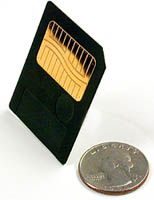
This economic reality defined the era of portable technology. Remove the Solid State Floppy (SSFDC). Most people just call it SmartMedia. Developed by Toshiba. It became the standard for digital cameras and PDAs in the late 1990s and early 2000s.
Smartmedia format
SmartMedia cards are smaller in size. 2 MB 4 MB Up to 128 MB. That was the limit.
Physical cards are small. Length about 45 mm. Width: 37mm. The thickness is less than 1 mm. It feels like thick plastic. It is lighter than a regular floppy disk.
The internal design is very simple. There are no complicated circuit boards. No complicated driver required. It has only one flash memory chip. The planar electrodes are connected to the chip using bonding wires. Everything is embedded in resin.
This uses a technology called Overmolded Thin Package (OMTP). Resin can be sprayed around parts and electrodes. It hardens into one solid piece. No soldering required. There is no need to worry about surface mounting technology. All you need is a chip, wire and plastic.
SmartMedia is simple and therefore cheaper to manufacture. But that also means it’s fragile. If the plastic cracks, the card is defective.
This design choice explains its disappearance. If the resin breaks, the connection is broken. And you can’t fix it. Hard drives have an error correction function. Smartmedia is nothing but chips and wires.
Why simplicity fails
The lack of a control chip is a fatal flaw. Modern SSDs and USB drives come with drivers. Control wear leveling. They handle bad blocks. Encrypt your data if necessary. Smartmedia does not do this. This is a collection of raw memory released to the world.
That’s why 128 MB SmartMedia cards are rarely used today. they are outdated. This format has been replaced by SD and CompactFlash. These formats have controls. They are stronger. As the price of flash memory has decreased, the need for separate small, fragile cards has disappeared.
Internal storage is standard. Phones suck up memory. The camera has a large card. There is no place to put a 1 mm thick card anymore.
Flash still on. However, for use inside the device. It is not a removable and breakable resin plate. The price of a megabyte has dropped so much that the cheapest form factor is no longer needed. Reliability is required. Smartmedia simply doesn’t offer it.
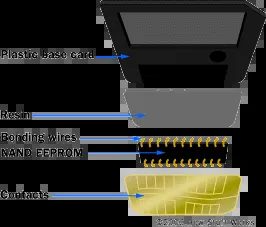
The actual SmartMedia card is more than just memory. This is built by gluing the NAND module to the base board. You slide a simple contact into the device and it gets power and data from it. The notch in the corner tells you exactly what voltage you need. Look at the card with the contacts facing up. If the notch is on the left side, 5 volts are needed. The right side represents 3.3 volts.
How SmartMedia manages data blocks
SmartMedia cards do not erase or write all data at once. They work in small units. We are talking about 256 or 512 byte increments. This approach allows for fast and reliable performance. You can determine what information is stored. This is useful.
However, they are fragile. Less durable than other removable solid state storage options. Handle with care. Keep it safe. Toshiba practically stopped production of the new smaller cards because of their higher capacity. xD-Picture Card and Secure Digital Card have taken over. SmartMedia is very hard to find these days.
How do CompactFlash cards differ?
SanDisk introduced CompactFlash cards in 1994. It differs from SmartMedia in two ways.
- It’s thick.
- Uses a controller chip.
Inside the sturdy case is a small circuit board. It has a built-in flash memory chip and a separate controller. That’s why the card is thicker than SmartMedia. It is 43 mm wide and 36 mm long. There are 2 types of them.
Type I The thickness of the card is 3.3 mm. Type II The thickness of the card is 5.5 mm.
Why is thickness important? Fit inside the device. Type II cards usually include a hard disk or additional memory controller. Type I stays slim, making it suitable for lightweight cameras and older laptops.
Why the control chip changed everything
The controller chip inside the CompactFlash card is responsible for data management. SmartMedia relies on the host device for memory management. This means that there are major compatibility issues with older systems. CompactFlash makes this task easier.
This change improves performance. You can also increase capacity over time. Users can save more photos without worrying about the processing power of their device.
Where are these older standards applied today?
These are not found in new products. However, they dominate the used market. Collectors want it. Retro gamers are looking for it. The archivist is looking for an old digital camera.
If you still have a SmartMedia card, check the notch. Make sure the voltage of your device matches. Do not bend. Don’t throw it away. The internal chip is exposed.
CompactFlash cards are easy to find. Many adapters convert them to SD slots. With a little tweaking, you can use it on modern devices.
Moving from SmartMedia to CompactFlash isn’t just about size. It’s about control. Controller chips give manufacturers more flexibility. This also increases the cost of manufacturing the cards. Smartmedia is still cheap. That’s why it died.
However, the logic applies. Smaller is not necessarily better. In some cases, additional physical size may be required. Sometimes you want simplicity with no moving parts.
Which do you miss more? Small SmartMedia or large CompactFlash? The answer may depend on the camera being used
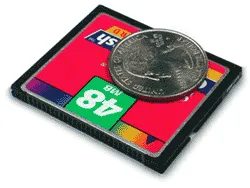
Advantages of CompactFlash
CompactFlash does not care about power consumption. It can handle 3.3V and 5V logic levels. This dual voltage flexibility facilitates integration with older devices. You don’t have to worry about whether your device’s motherboard is new or old standard. The card works fine.
Bigger than SmartMedia
Size matters here. CompactFlash cards are thicker than SmartMedia. This extra space is more than just plastic. This allows more NAND flash chips to be used. This way you get a larger storage capacity. While SmartMedia reached its limits early on, CompactFlash has expanded significantly. You can find cards with capacities ranging from 8 MB to 100 GB.
Controller differences
This is where technology gets interesting. CompactFlash contains an internal driver. Smartmedia is not like that. This little chip does the heavy lifting. Handles debugging. Control wear leveling. Translate the commands.
This is most important for devices with slow processors. The controller loads the work of the main processor. Cameras and scanners do not require powerful processors to write data quickly. The card communicates with the host, but the controller handles the complex details.
Trade-offs for complexity
Controller chips add complexity. It adds dimension. Add weight. Contrast this with the basic nature of smart media. The latter is just the tablet’s memory. There are no moving parts. No extra silicone. The compact flash is larger. The situation is even more complicated. But with that complexity comes performance and capacity. Pay by volume and weight. You can understand that in practice.
The landscape of the removable storage is defined by a tug of war between open standards and private walled gardens. If you look at the hardware used in early digital cameras and mobile devices, you can see the influence of PCMCIA (Personal Computer Memory Card International Association). Management of PCMCIA Type I and Type II slots and standards such as CompactFlash and SmartMedia are based on these specific rules. result? A level playing field where you are not tied to one ecosystem for your basic storage needs.
This interoperability is a game changer. You can also insert a CompactFlash card into the camera, pull it out and insert it into a regular PCMCIA card slot on your laptop or an adapter plugged into a USB port. Some adapters can also read these cards through a floppy drive. This sounds old-fashioned, but it’s a smart choice for users of older machines.
“Standardized removable memory puts the world at your fingertips.”
But let’s be clear: standards don’t win every battle. Sony’s Memory Stick is an excellent example of a format that originated in a unique walled garden. It’s tightly integrated into Sony’s ecosystem, but will eventually trickle down to third-party devices as well. Memory cards for video game consoles are even more isolated. These tend to be completely unique. Take the original PlayStation and PlayStation 2 as an example. It uses a specific memory card to save game progress. When the PlayStation 3 launched, it offered backwards compatibility for the games themselves, but removed the hardware slot from older memory cards.
Do you need to transfer stored data? You cannot insert the card directly. You need to buy a special adapter. This is a sticking point, but it also highlights why common standards are so valuable. Without them, every device becomes an island. As components become more interchangeable (through wireless technologies such as Bluetooth ), standardized memory frees you from hardware limitations.
The next generation: PRAM and phase change memory
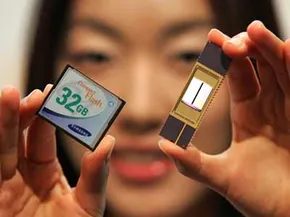
While we’ve been optimizing flash, engineers have been looking for something faster. In September 2006 Samsung boldly announced PRAM or Phase Change Random Access Memory.
This is not just an incremental update. PRAM tries to bridge the gap between two different storage types:
– RAM : Fast but unstable (data is lost if power goes off).
– Flash : Non-volatile (stores data forever), but slower.
PRAM combines the speed of RAM with the non-volatility of flash memory. Some insiders started calling it “The Perfect RAM ” because it promised to offer the best of both worlds.
In particular, it is quite aggressive. Samsung claims that PRAM is 30 times faster than traditional flash memory. 10x longer service life**. These are not just marketing buzzwords. They address two of the biggest pain points in storage today: write speed and durability.
Commercial availability and future implications
Samsung plans to release its first commercial PRAM chip in 2010. What is the initial capacity? 512 MB. At first glance, this may seem small compared to the terabytes currently in use, but remember where it all started. These chips are aimed at cell phones and other mobile devices. The goal is not to replace the hard drive overnight. It is intended to replace the flash memory of portable devices.
Can PRAM completely replace flash memory? This is a great opportunity. If the speed and durability requirements hold true in real-world testing, mobile device architectures could change dramatically. No more waiting for files to save. No more worrying about SSD wear limits. Instant and continuous recording.
Frequently asked questions
Is flash memory the same as RAM?
No, the purpose is different. RAM is volatile, which means data is erased when the power is turned off. Used for active processing. Flash memory is non-volatile and retains data even when the power is turned off. It is used for storage.
What exactly is flash memory?
Also known as flash memory, it is a type of non-volatile memory that can be electrically erased and reprogrammed. This powers USB drives, SD cards and modern solid state drives.
Where next
If you want to better understand how these components fit together, there are many resources available. Memory has a complicated history, evolving from simple ROMs to complex virtual memory systems.
Related articles:
– How computer memory works
– How memory works
– How virtual memory works
– How ROM works
– How removable storage works
– How the BIOS works
Useful links:
– CompactFlash Association
– Kingston: The Ultimate Memory Guide
– Transtronics: How EPROM works
– A brief history of microprogramming
Source:
– UK Gizmodo. “Pretec Releases 100GB CompactFlash Card: OMG!” September 26, 2008.
– Continuous Yi. “Intel and STMicroelectronics Unveil Industry’s First Phase Change Memory Prototype.” February 6, 2008.
– supermediastore.com. “What are SmartMedia flash cards?”
– Techtree.com. “Phase change instead of lightning?” December 11, 2006.